
Flashforge Adventurer 5M Pro Review
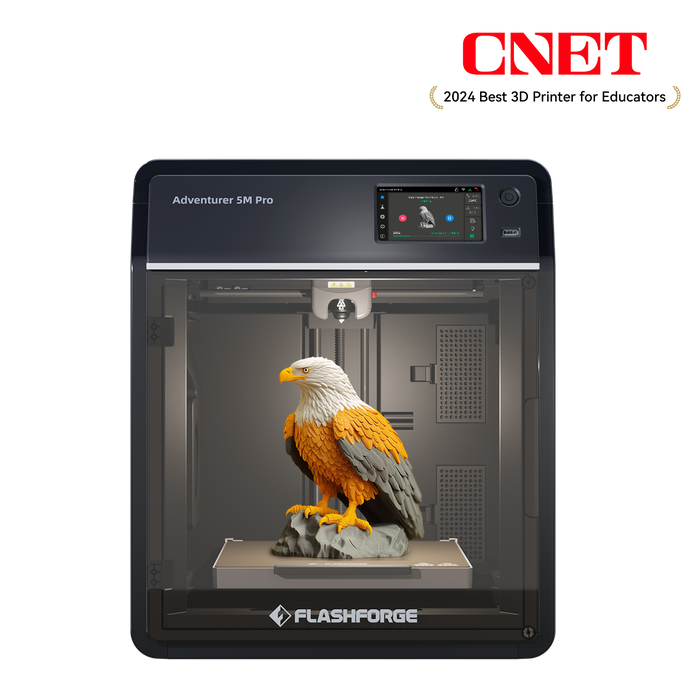
A fast, enclosed CoreXY workhorse for serious home makers and small studios.
At a glance
- Type: Enclosed CoreXY FDM 3D printer
- Build volume: 220 x 220 x 220 mm
- Max speed (claimed): up to 600 mm/s
- Best for: Tech enthusiasts, makers, schools and small studios that want fast, reliable PLA and PETG printing
Pros
- Very fast CoreXY motion system once tuned
- Fully enclosed build chamber with air filtration
- Direct drive extruder handles detailed parts well
- Quick swap nozzles and flexible PEI build plate
- Good out of the box profiles for common materials
Cons
- Headline speeds need careful slicer tuning to achieve
- Software experience is not as polished as some rivals
- Fans can be quite noisy at full performance
- Flexible and exotic filaments need a bit of patience
Overview
The Flashforge AD5M Pro is part of a new generation of high speed, enclosed CoreXY printers that aim to bring serious performance into a compact, home friendly box. You get a 220 x 220 x 220 mm build volume, a rigid metal frame, an enclosed chamber with filtration and a direct drive toolhead that is happy printing everyday materials like PLA, PLA+ and PETG at speeds that would make older printers blush.
This is a very appealing package for a single all rounder 3D printer. In practice, it is a capable and rewarding machine, as long as you are prepared to spend a little time getting your slicer profiles dialled in and you can live with a bit of fan noise when it is running flat out.
Design and build
At first glance the AD5M Pro looks more like a smart appliance than a hobbyist 3D printer. The electronics and motion system are tucked away behind clean panels, the print area is fully enclosed and there is a bright touch screen on the front for everyday control. There are no loose belts or dangling cables on display, which makes it much less intimidating for newcomers.
The CoreXY motion system lets the print head move quickly and precisely in the X and Y axes while the heated bed moves only in Z. In everyday use this translates into snappy travel moves, crisp corners and the ability to maintain good print quality at higher speeds than the typical budget bed slinger.
Filament sits on an external spool holder and feeds into a direct drive extruder inside the enclosure. The build plate is a flexible PEI coated sheet that pops out of the printer when your part is finished, so you can simply flex it to release the print without digging at it (and potentially damaging it) with a scraper.
Setup and first print
One of the big selling points of the Pro is that it arrives largely pre assembled. In most cases you are looking at unpacking the printer, removing a few transport screws, attaching the spool holder and following the on screen prompts for the first calibration. The days of needing a PHD in engineering just to build the 3D printer itself are long gone.
Automatic bed levelling and Z offset calibration are handled through a guided routine on the touch screen. It is not quite one click magic, but it is straightforward and you only have to do it occasionally or when changing parts of the build surface. Once levelled, loading filament is simple and the included sample profiles give you a good starting point for your first PLA prints.
Print quality and performance

The obvious headline is speed. Out of the box the default profiles are already faster than many older machines and with careful tuning you can push it harder while still getting attractive surfaces.
Print quality is strong, especially on typical tech and gadget parts: brackets, enclosures, mounts, toy accessories and decorative prints. The direct drive extruder copes well with small retractions and tricky details, so fine surface textures and small lettering come out clean when the slicer settings are dialled in.
Where you do need to be realistic is with very flexible or high temperature filaments. The AD5M Pro is happiest with PLA and PETG and can handle moderate TPU if you take it slowly and follow best practice. If you are hoping to print large, demanding engineering materials every day, you may want to treat this as a fast general purpose workhorse rather than a dedicated engineering machine.
Software and workflow
Flashforge provides its own slicer profiles and integration, and there is support for third party slicers if you are comfortable doing a bit of manual profile tweaking. The bundled profiles are perfectly usable for getting started but the printer really rewards the sort of user who enjoys experimenting with acceleration, input shaping and cooling settings to find the sweet spot between speed and surface finish.
You can send jobs to the printer via USB, Wi Fi or Ethernet, and there is a built in camera for remote monitoring and time lapse recording. The camera is more about checking that a print is still on the bed than capturing cinematic footage, but it is a genuinely handy feature if your printer lives in another room and also, let's be honest, there nothing cooler than seeing your latest creation take shape in super-fast time-lapse video that you can then share with your friends and family.
Noise, enclosure and filtration
The enclosed design helps keep the print area at a more stable temperature, which is great for taller or more sensitive parts, and it also contains a lot of the smell from hot plastic. The AD5M Pro includes air filtration, which is a welcome addition if you are running longer jobs in a home office or classroom.
That said, this is still a high performance machine with multiple fans. When printing at full speed it is audible, so you will notice it if it is on a desk right next to you. There is a lower noise mode that trades a little performance for a quieter overall sound, which is useful for overnight or classroom printing. However if you were planning on siting the printer in your main living room then your partner may have a thing or two to say about that!
Who is the Flashforge AD5M Pro for?
If you are coming from a slower, open frame printer, the AD5M Pro feels like a big step up. It is an excellent choice if you:
- Want an enclosed CoreXY printer that looks tidy enough for a home office or classroom
- Regularly print gadget parts, brackets and functional components and value fast turnaround
- Are happy to tweak slicer profiles to get the very best speed and quality combination
- Prefer a single, do it all machine rather than a fleet of slower printers
If you are brand new to 3D printing and want absolute plug and play simplicity, there are simpler, slower machines that will hold your hand a bit more. The AD5M Pro is beginner friendly in terms of hardware but its speed potential really comes alive in the hands of someone willing to experiment.
Key specifications
| Technology | FDM, enclosed CoreXY |
|---|---|
| Build volume | 220 x 220 x 220 mm |
| Layer height | From 0.1 mm (typical 0.2 mm) |
| Nozzle | 0.4 mm fitted (other sizes optional) |
| Max print speed | Up to 600 mm/s (with tuned profiles) |
| Supported materials | 1.75 mm PLA, PLA+, PETG and selected flexible and higher temperature filaments |
| Bed surface | Removable flexible PEI plate, heated bed |
| Connectivity | USB, Wi Fi, Ethernet |
| Extra features | Enclosed chamber, air filtration, built in camera, touch screen, auto bed levelling |
Verdict
The Flashforge AD5M Pro is a very appealing option if you are looking for a fast, enclosed 3D printer that can comfortably live in a home office or workshop and spend its days turning out gadgets, brackets and project parts. It offers serious speed and solid print quality, and the enclosed design with filtration is a big plus for shared spaces.
It is not the cheapest option on the market, and you will get the most from it if you are happy tuning slicer profiles rather than treating it as a pure appliance. But if you want to step up from beginner machines into something that feels genuinely capable and futureproof, the AD5M Pro is a strong contender.
Compare 3D Printers Deals
View the latest prices and deals on 3d printers from UK retailers.